
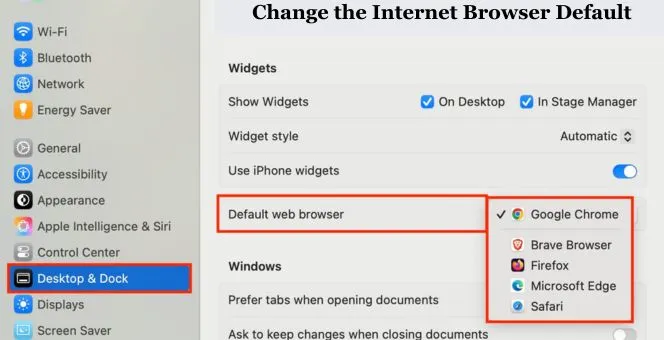
How to Change the Internet Browser Default Step-by-Step Guide
One Simple Setting That Changes How You Browse
Sometimes, a small setting can quietly shape your whole online experience. Every link you open, every page you read, every form you fill out depends on one simple choice. Your default internet browser default. Many people never change it, not because they are happy with it, but because they do not know how or why it matters.
The truth is simple. When your browser works the way you want, the internet feels faster, cleaner, and less frustrating. A few clicks can save you time every single day. That feeling of control matters more than most people realize.
In this guide, we gently walk through how to change the internet browser default on different devices, why this choice affects your daily routine, and how to make sure the change actually stays in place.
Why the Default Browser Setting Matters More Than You Think
Your default browser decides what opens when you click a link in an email, message, or app. If it is slow or uncomfortable, every task feels heavier. If it feels familiar and smooth, the web becomes easier to handle.
A better default browser can help you:
- Open links faster without extra steps
- Keep your browsing habits consistent
- Reduce distractions and confusion
- Feel more comfortable navigating the web
This is not about advanced technology. It is about making the internet work around you, not the other way around.
Understanding How Default Browsers Work
Before changing anything, it helps to understand what “default” actually means. Your device always chooses one browser as the main option. Any link clicked outside a browser opens there automatically.
Changing this does not remove other browsers. It only tells your system which one to trust first. You can still use others anytime you want.
How to Change the Internet Browser Default on Android Devices
Android gives users flexibility, but settings can feel hidden if you are not used to them.
How to change the internet browser default on android
Open your phone’s settings and scroll slowly. Look for “Apps” or “Applications.” Inside, find an option called “Default apps.” This section controls what your phone uses automatically.
Tap on “Browser app.” A list will appear. Choose the browser you want to use every day. Once selected, your phone remembers this choice.
How to set default browser in Android
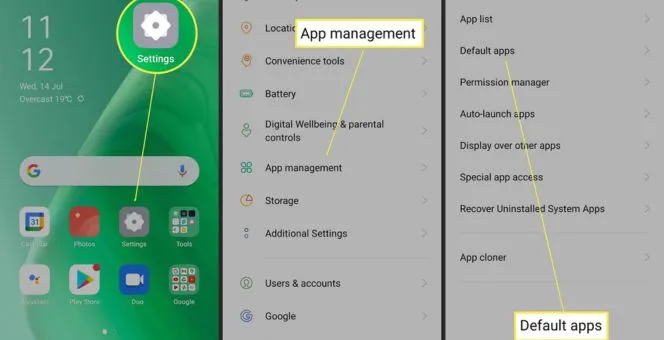
After selecting your browser, test it. Open a link from a message or email. If it opens in the browser you chose, the change worked. If not, repeat the steps and make sure no other app is overriding your choice.
How to Change the Internet Browser Default Samsung Phones
Samsung devices add an extra layer to Android settings, which can feel confusing at first, especially for users who regularly explore advanced features or work with AI Tools for Developers and expect faster, more direct control over system preferences.
How to change the internet browser default samsung
Go to Settings, then Apps. Tap the three dots in the corner and choose “Default apps.” Select “Browser app” and pick your preferred option.
Samsung devices sometimes reset defaults after updates, so it is smart to check this setting once in a while.
Changing Default Browser on Windows Computers
Windows systems handle default browsers differently depending on the version. The steps are easy once you know where to look.
How to change default browser Windows 10
Open Settings and go to “Apps.” Click on “Default apps.” Scroll until you see “Web browser.” Click the current browser icon and choose another option.
Close settings and try opening a link from a document or email to confirm the change.
Set Chrome as default browser Windows 10
If you want Chrome as your main browser, follow the same steps. When selecting the browser, choose Chrome. Windows will apply it instantly without restarting.
Set Chrome as Default Browser Windows 11
Windows 11 changed the process slightly, which can surprise users.
Set Chrome as default browser Windows 11
Go to Settings, then Apps, and open “Default apps.” Search for Chrome. You will see a list of file types and link types. Click each one and set Chrome as default. This takes a little longer, but once done, Windows respects your choice fully.
How to Change Default Browser on Google Chrome Itself
Sometimes, even after system changes, Chrome asks for confirmation.
How to change default browser on Google Chrome
Open Chrome and go to Settings. Look for the “Default browser” section. Click “Make default.” This sends a signal to your system, reinforcing the change. This step helps prevent your system from switching back later.
How to Change the Internet Browser Default Chrome on Different Devices
Chrome behaves slightly differently depending on where you use it.
How to change the internet browser default chrome
On desktops, Google Chrome follows the system’s settings. On Android, Google Chrome follows the system’s settings, and on iOS it follows the device’s settings. For the best results, always set the system defaults and check inside Chrome.
Issues Encountered After Users Change Default Browser
When changing the default browser on a device, the process may seem cumbersome, but rest assured, It is straightforward.
- Another app may be set as the default
- Some default options may be reset after a system update.
- The update does not contain the necessary permissions.
- Just as before, revisit the default app settings. A simple check and you can save a long process.
Tips To Ensure Your Default Browser Stays Changed
These simple rules give you the best chance to retain your web browser settings and will give the best chance to minimize web browser settings.
- Check your settings again after the device installs a system update.
- Do not select “always” on any prompts you do not recognize.
- Avoid using multiple web browsers on your device.
- These restrictions help to reinforce the system memory to your chosen settings.
Final Words on Internet Browser Default
You may be able to change your default browser now, but the real value will be seen in the confidence, ease, and speed of your internet browsing. You will feel a sense of relief when you can open your browser, and the internet will open exactly where you want it to.
It can often go unnoticed, but changing your default web browser can greatly improve your internet experience. You will likely feel an instant sense of relief when you change your default browser. You may be asking yourself why you have not done it before. Getting a simpler web experience is your priority when changing your default web browser.
FAQ’s
System updates and certain app permissions may reset default apps. Check your settings.
Yes. The default only determines what apps will open links automatically.
Not restarting may help if the changes don’t take effect.
Yes. It does not impact your data or files.